What it actually looks like
Real screens from the current version. Nothing staged, nothing repainted.
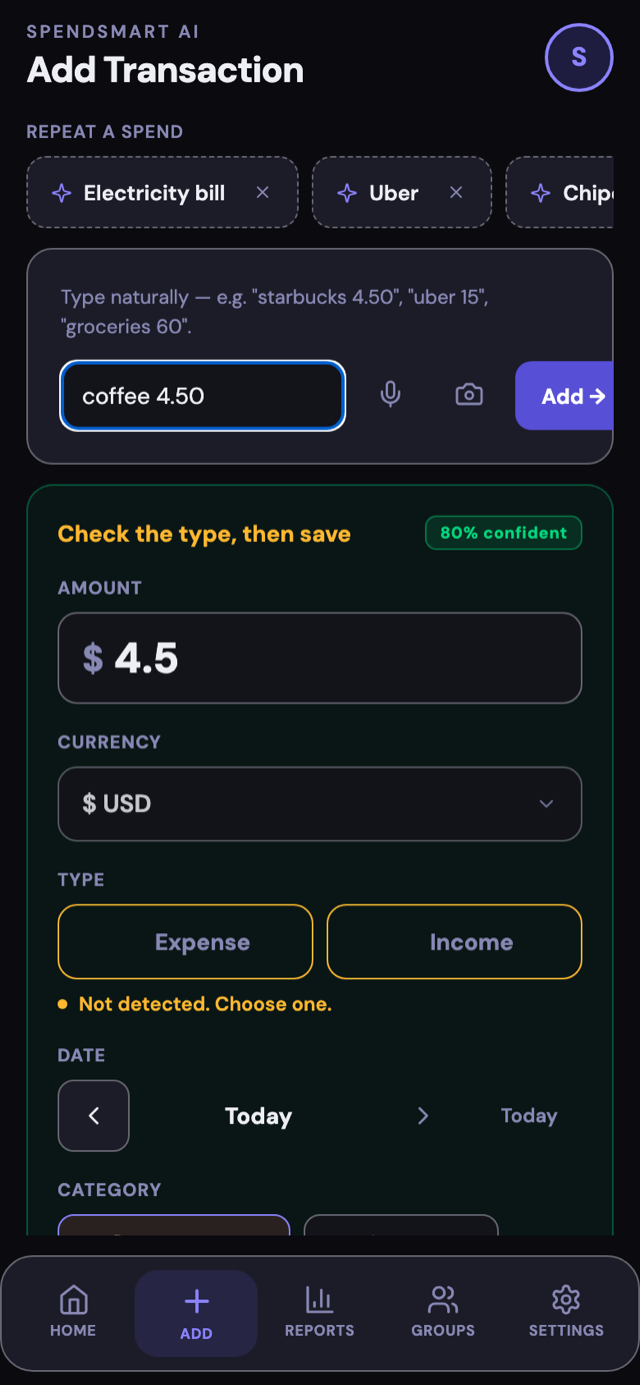
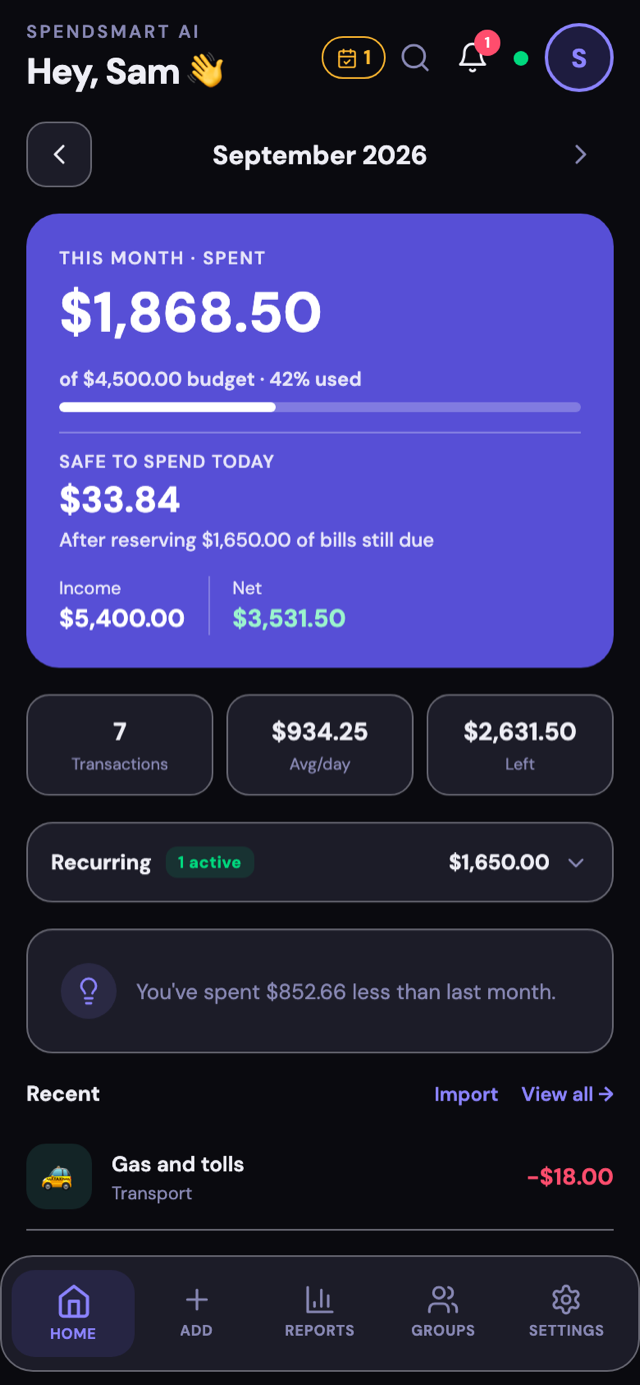
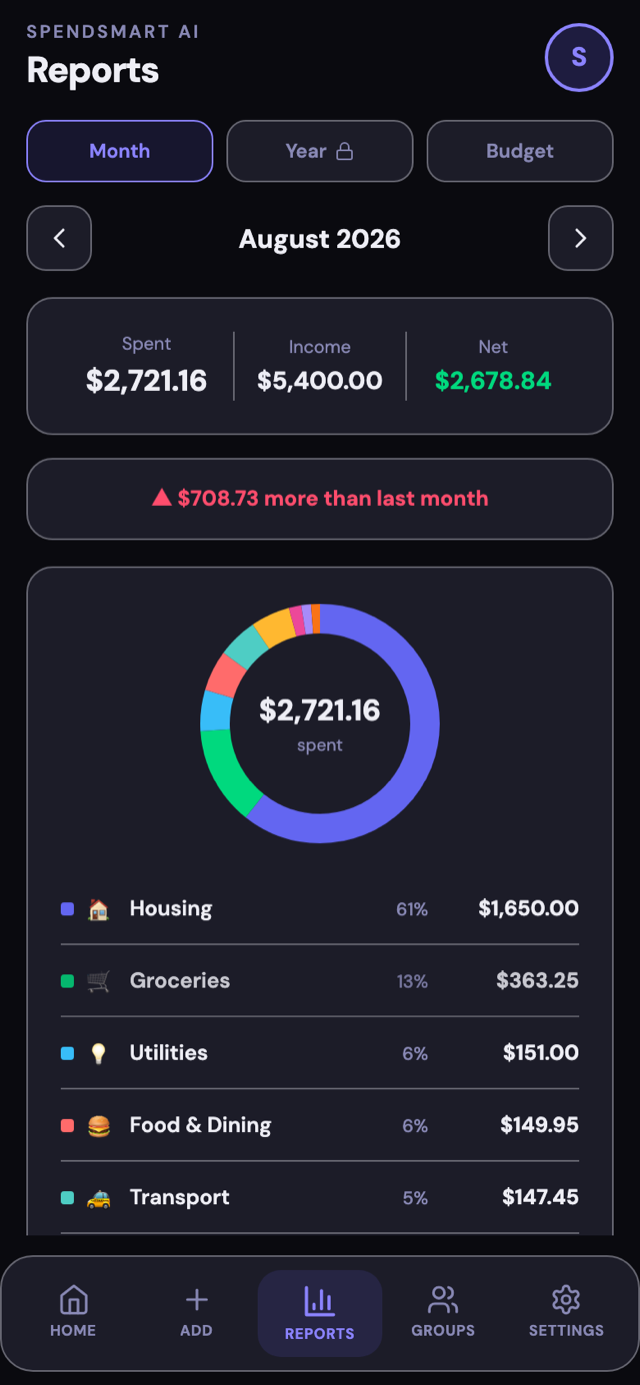
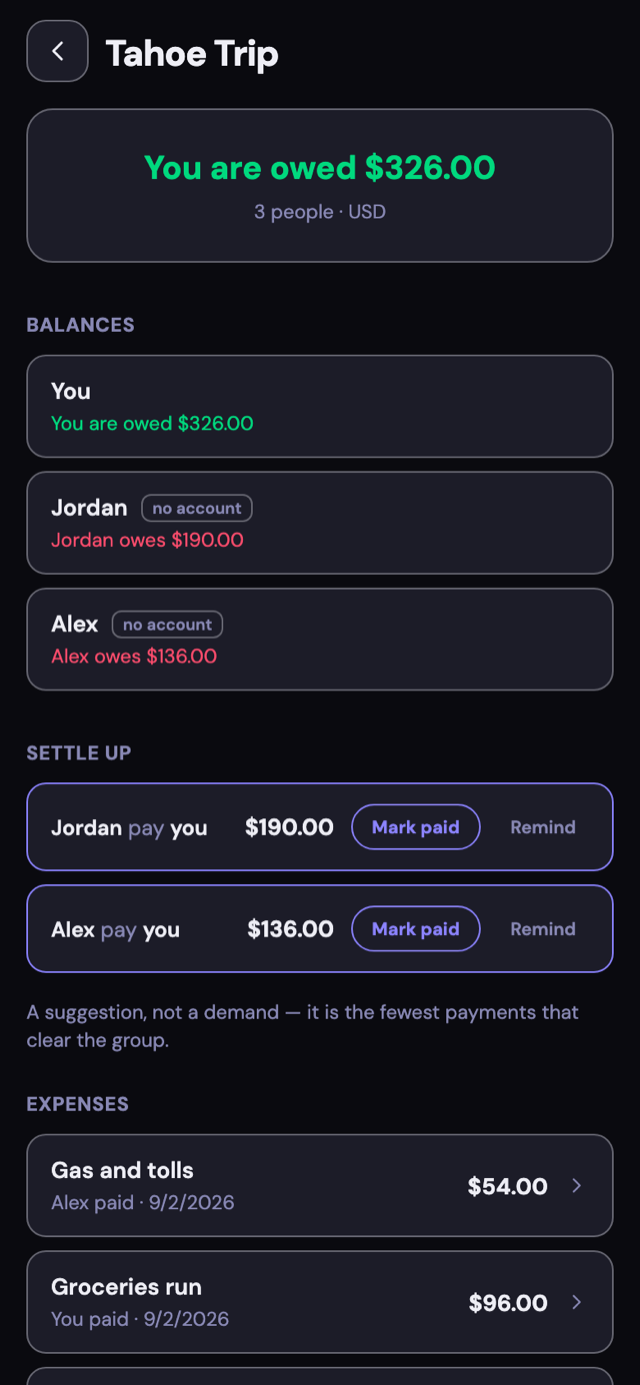
Type or say an expense and AI fills in the rest, or snap a receipt (Pro). No bank login, ever; your data stays on your device.
Or sign up free in seconds with just an email. Your data syncs across every device.
Real screens from the current version. Nothing staged, nothing repainted.
From a quick thought to a tracked expense in seconds.
Jot a quick note like "coffee 5" or just say it out loud. No forms, no dropdowns.
Our AI reads it and fills in the amount, category, and date. Change a category and it remembers that phrase next time.
Watch your spending take shape, with a plain-English monthly summary (Pro).
No bank login, and no forms to fill. Capture spending however suits the moment.
Say it, type it, or snap a receipt. "coffee 5" becomes a categorized expense. Receipt scanning is Pro.
Share a trip, a flatshare or a dinner. Split a bill evenly, by exact amounts, or line by line from a receipt you scan with Pro, and each person's share lands in their own ledger, so your budgets and reports stay right with no extra work. Groups are online only, and a group expense is a shared record every member can edit. Everything outside a group stays private.
Share a receipt straight into SpendSmart AI from your photos or any other app. On iPhone, ask Siri or run a Shortcut. On Android, long-press the icon and land on Add. A screenshot of a payment confirmation works the same way: the AI reads it, shows you what it found, and waits for you to say yes.
Put Safe to Spend on the home screen and see what is left without opening anything. On iPhone it sits on the lock screen too, and you can ask Siri how much is safe to spend and hear the answer. The Quick Add widget puts one tap between you and a logged expense.
A recurring rule in SpendSmart AI can be income as well as a bill, so rent received, a salary or a retainer is entered once and logs itself. Only what goes out is reserved against your budget, which is what keeps "safe to spend" honest. Three rules free, bills and income counted together.
Your own categories, with your own icon and colour. Templates for the things you buy every week, so a repeat purchase is one tap. And if you would rather not use today's exchange rate, save your own for that currency pair and every foreign entry uses it instead.
Already have months of spending in a statement? OFX, QFX and CSV files are read on your device, so they're free and unlimited. A PDF goes to the AI: one a month on Free, unlimited on Pro.
Every expense lands in a category on its own. Correct one and the app remembers that phrase, so the same entry is right the next time you type it.
Local-first, so it works with no signal at all. Sync happens the moment you are back online, and only if you are signed in.
Log an expense abroad in the currency you actually paid in. SpendSmart AI converts it to your home currency and keeps both figures, or uses the rate you saved for that pair if you set one. Moved countries? Change your home currency in Settings. Every entry keeps the amount and currency you paid in. Your totals switch to the new currency at the rate you set.
Search by merchant, category, amount, note or date, with results filtering as you type. Or tap any category in Reports and see the transactions behind the number, instead of a total you have to go hunting for.
There are no ads anywhere in SpendSmart AI, on Free or Pro. It never asks for your bank credentials, and it never sells your data. That is the whole business model.
A group is a shared ledger for people who split costs: a flatshare, a trip, a couple, a household.
A flatmate with no account and no email address is still a member with a balance. Invite them by link later if you want to, and choose how long the link works: 7, 30 or 90 days.
Send the invite link and the person ticks the items that were theirs, on a web page, with no account and nothing to install. Their share of tax, tip and service follows what they picked rather than being spread evenly.
Evenly, by exact amounts, or line by line from a receipt scanned with Pro, so the person who skipped the wine does not pay for it. Each line carries its quantity, so two coffees on one row can go to two people.
Your share of a group expense lands in your own transactions, so your budgets and reports include it automatically. Nothing else you track is ever visible to the group.
Recorded a payment that never happened? Withdraw it if you claimed it, void it if you confirmed it. Every balance follows, and the group keeps an honest record of what changed.
SpendSmart AI works out the fewest payments that clear everyone, then records what you paid outside the app. It never moves money itself. You can save where you would like to be paid, such as a UPI ID or a PayPal address, so the people who owe you know where to send it. Tap it and their Venmo, Cash App or PayPal opens, or a UPI app on Android, with the amount filled in where the rail supports it. The transfer itself happens in their own app.
Groups you are invited to have never counted towards that, and deleting one frees the slot. Each group has unlimited members and unlimited expenses. Pro removes the limit on how many you can start.
Import a group from a Splitwise export, balances and all, and the same works for a Settle Up export. And you can export any group whenever you want, on the free plan, which is not something every bill splitter lets you do.
Bring your history with you. It takes one file and about a minute.
Money Manager, Wallet by BudgetBakers and Finny all export a CSV, and SpendSmart AI knows the shape of each one. Pick the file and the columns are already filled in.
Not on that list? You'll see what we think each column is and you confirm it before a single row is saved. Confirm once and we'll remember that bank next time.
OFX, QFX and CSV files are read on your phone, so there's no limit on how many you bring in. Only a PDF, or a file the phone can't read, goes to the AI, and the app asks you first.
Another app's category names rarely map cleanly onto ours, so every row arrives on ours and you adjust anything you want in the review step. It takes about a minute.
Tracking is only useful if it changes what you do next.
Set a monthly budget and see what is left per day. Recurring bills still due are set aside first, so the number is what is actually yours.
Budget by category or overall, and save toward something specific. Three budgets on Free.
See where the month is heading before it gets there, based on how you have spent so far.
A midday nudge, an evening one, or a heads-up the day a bill is due. Each has its own time, and each can be switched off. Scheduled on your phone, never on a server.
Log something each day and the streak grows. Badges mark the milestones. Free for everyone, and once earned they are never taken away.
A plain-English summary of where the money went, with places to save. Pro.
Start free. Upgrade when you want more.
Pro is $2.99/month or $25.99/year.
Prices shown for your region. Final price confirmed at checkout.
Real feedback from real SpendSmart AI users.
Managing Group Trips and sending the splits is piece of cake now and simple to use.
This app does not have bank sync but does have an option to import bank statements. That is great. Doing manual entry daily helps me uncover any thoughtless or emotional expenses. Helps me appreciate my income.
I love the reminder function, I get to choose if I want them or not, I get to choose what time I get reminders to add my input in the app. Encourages me to add daily with Achievements.Also I am very surprised this is ad free. The free tier is genuinely usable
Before: Tracking my spending was difficult. I didn’t know where i was spending my money and at the end of the month o was wondering where did it all go.
I was able to understand where I was spending, set budgets, recurring expenses, knew how many subscriptions I had, found I was paying twice for Netflix under two different accounts. Early days but liking it. Just need to get into the habit of logging daily. Reminders sure do help
This is a great app. Easy to use, tons of features. I have received three updates during my time using it, each one had brought new features and ease of use.
The things people ask before they decide.
No. SpendSmart AI does not connect to a bank, does not use an aggregator like Plaid, and does not ask for banking credentials at any point. That is a deliberate product decision. Instead of pulling transactions from a bank, you add them yourself in whatever way is fastest: type a phrase like "coffee 5", say it out loud, photograph a receipt, or import a statement file you already have. The AI reads whichever you give it and fills in the amount, category and date. The result is that there is no bank login to leak, because there is no bank login at all.
Records live on the device first, which is why SpendSmart AI stays fast and keeps working with no signal. Once signed in, that data also syncs securely to an account so it is backed up and available on other devices, and while offline every change is saved locally and syncs the moment the connection returns. Signing out stops syncing on that device while the cloud copy is kept. Because nothing is ever pulled from a bank, the only financial data SpendSmart AI holds is what someone chose to enter. Everything can be exported to CSV on any plan, and both local data and the whole account can be deleted from inside the app.
Free is a usable plan, not a trial. It covers unlimited transactions, twelve months of history, ten smart typed entries a month, five voice entries a month, AI categorization, three budgets, three recurring entries, three shared groups you start, with no limit on the ones you're invited to, CSV export and offline sync. Statement files in OFX, QFX or CSV are read on your device, so SpendSmart AI doesn't meter those at all; only a PDF, or a file it can't read, needs the AI, and Free includes one AI statement import a month. Pro costs $2.99 a month or $25.99 a year in the United States and is priced by region elsewhere, so the figure shown depends on location and is confirmed at checkout. Pro removes the monthly limits and adds receipt scanning, AI monthly insights, unlimited recurring entries, PDF reports, full history beyond twelve months, unlimited shared groups, and priority support.
Three, all from the same box on the Add screen, plus a manual form for anyone who would rather fill in fields directly. Typing in plain language is enough, so "zomato 485" works and SpendSmart AI figures out the rest. Tapping the microphone captures the same phrase spoken aloud, which runs through exactly the same parser as typed input. Tapping the camera scans a receipt and reads the merchant, date and amount; receipt scanning is a Pro feature. Typed, spoken and scanned entries all show a review card before anything is saved, so the AI never commits a guess unseen.
Yes, and it's the fastest way to start with real history rather than an empty app. Open Settings, choose Import from statement, and pick a file up to 10 MB; the first 500 rows are read. OFX, QFX and CSV files are parsed on your device and never uploaded anywhere, which is why SpendSmart AI doesn't limit how many you bring in. A PDF goes to the AI instead, and Free includes one AI statement import a month. Either way the rows are shown for review, so anything unwanted can be unticked and any category corrected before a single transaction is saved. Rows resembling ones already recorded are flagged as possible duplicates and left unticked.
It is the number SpendSmart AI shows on Home once an overall monthly budget exists, and it answers the only question a budget really needs to answer: what can be spent right now without breaking it. It takes the monthly budget, subtracts what has already gone, and then sets aside any recurring expenses still due before the month ends, so the figure is what remains after the bills rather than before them. That last step is what makes it trustworthy. If the remaining commitments already use up what is left, it says so plainly instead of showing a comfortable number that would only mislead.